English: Choose your language in the box right below. | Vietnamese: Chọn ngôn ngữ của bạn trong hộp bên dưới. | Abkhazian: Иалшәх шәбызшәа ҵаҟа иаагоу аҭаӡҩыраҿы. | Afrikaans: Kies jou taal in die blokkie regs hieronder. | Acehnese: Pileh basa droeneuh lam kotak tepat di miyup nyoe. | Acoli: Yer leb ma imito i bok ma tye piny kany. | Afar: Gubal yan sandugih addat isi af door. | Akan: Paw wo kasa wɔ adaka a ɛwɔ ase hɔ pɛɛ no ​​mu. | Albanian: Zgjidhni gjuhën tuaj në kutinë menjëherë më poshtë. | Amharic: ከዚህ በታች ባለው ሳጥን ውስጥ ቋንቋዎን ይምረጡ። | Arabic: اختر لغتك في المربع الموجود أسفل هذا مباشرةً. | Armenian: Ընտրեք ձեր լեզուն ներքևի վանդակում։ | Assamese: তলৰ বাকচটোত আপোনাৰ ভাষা বাছক। | Aymara: Aka amparamp qillqt’at cuadro ukanx arunak ajlliñamawa. | Azerbaijani: Aşağıdakı qutuda dilinizi seçin. | Bambara: I ka kan sugandi yɔrɔ la min bɛ duguma yɛrɛ. | Bangla: ঠিক নিচের বক্সে আপনার ভাষা নির্বাচন করুন। | Basque: Aukeratu zure hizkuntza beheko laukian. | Belarusian: Выберыце мову ў полі справа ніжэй. | Bhojpuri: ठीक नीचे दिहल बॉक्स में आपन भाषा चुनीं। | Bosnian: Odaberite svoj jezik u polju odmah ispod. | Bulgarian: Изберете езика си в полето точно по-долу. | Burmese: အောက်ပါ ညာဘက်အကွက်တွင် သင့်ဘာသာစကားကို ရွေးချယ်ပါ။ | Catalan: Trieu el vostre idioma al quadre que hi ha just a sota. | Cebuano: Pilia ang imong pinulongan sa kahon sa ubos. | Central Kurdish: لە بۆکسەکەی خوارەوە زمانەکەت هەڵبژێرە. | Chinese (Simplified): 请在正下方的方框中选择您的语言。 | Chinese (Traditional): 請在正下方的方格中選擇您的語言。 | Vietnamese: Chọn ngôn ngữ của bạn trong hộp bên dưới. | Corsican: Sceglite a vostra lingua in a casella ghjustu quì sottu. | Croatian: Odaberite svoj jezik u okviru odmah ispod. | Czech: Vyberte si jazyk v poli hned níže. | Danish: Vælg dit sprog i boksen lige nedenfor. | Dari: زبان خود را در کادر درست زیر انتخاب کنید. | Divehi: ހަމަ ތިރީގައިވާ ފޮށީގައި ތިމާގެ ބަސް ހޮވާށެވެ. | Dogri: ठीक थल्ले दित्ते गेदे बॉक्स च अपनी भाशा चुनो। | Dutch: Kies uw taal in het vak direct hieronder. | Dzongkha: གཤམ་གྱི་སྒྲོམ་ནང་ལུ་ ཁྱོད་རའི་སྐད་ཡིག་གདམ་ཁ་རྐྱབས།. | Esperanto: Elektu vian lingvon en la skatolo sube. | Estonian: Valige oma keel allolevas kastis. | Ewe: Tia gbe si nèdona le aɖaka si le ete tututu me. | Fijian: Digitaka na nomu vosa ena kato e ra sara ga. | Filipino: Piliin ang iyong wika sa kahon sa ibaba. | Finnish: Valitse kielesi alla olevasta laatikosta. | French: Choisissez votre langue dans le cadre juste en dessous. | Friulian: Sielzi la tô lenghe inte caselle sot. | Fulani: Suɓo ɗemngal maa e nder lowre les ndee. | Galician: Escolle o teu idioma no cadro de embaixo. | Ganda: Londa olulimi lwo mu kasanduuko wansi ddala. | Georgian: აირჩიეთ თქვენი ენა ქვემოთ მოცემულ ველში. | German: Wählen Sie Ihre Sprache im Feld direkt darunter. | Greek: Επιλέξτε τη γλώσσα σας στο πλαίσιο ακριβώς από κάτω. | Romanian: Alegeți limba în caseta de mai jos. | Russian: Выберите язык в поле прямо ниже. | English: Choose your language in the box right below. | Vietnamese: Chọn ngôn ngữ của bạn trong hộp bên dưới. | Guarani: Eiporavo ne ñe’ẽ pe cuadro oĩva iguýpe voi. | Gujarati: નીચે આપેલા બોક્સમાં તમારી ભાષા પસંદ કરો. | Haitian Creole: Chwazi lang ou nan kare ki anba a. | Hausa: Zaɓi harshen ku a cikin akwatin dama a ƙasa. | Hawaiian: E koho i kāu ʻōlelo ma ka pahu ma lalo. | Hebrew: בחר את השפה שלך בתיבה ממש למטה. | Hindi: ठीक नीचे दिए गए बॉक्स में अपनी भाषा चुनें। | Hmong: Xaiv koj hom lus hauv lub thawv hauv qab no. | Hungarian: Válassza ki a nyelvet a jobb oldali mezőben. | Iban: Pilih jaku nuan ba kutak ba baruh tu. | Icelandic: Veldu tungumál í reitnum hér fyrir neðan. | Igbo: Họrọ asụsụ gị n'igbe dị n'okpuru. | Iloko: Piliem ti pagsasaom iti kahon iti baba a mismo. | Indonesian: Pilih bahasa Anda di kotak tepat di bawah ini. | Irish: Roghnaigh do theanga sa bhosca ar dheis thíos. | Italian: Scegli la tua lingua nel riquadro qui sotto. | Jamaican Patois: Chuuz yu langwij iina di baks rait dong ya so. | Japanese: すぐ下のボックスから言語を選択してください。 | Javanese: Pilih basa sampeyan ing kothak ing ngisor iki. | Kannada: ಕೆಳಗಿನ ಪೆಟ್ಟಿಗೆಯಲ್ಲಿ ನಿಮ್ಮ ಭಾಷೆಯನ್ನು ಆರಿಸಿ. | Kazakh: Төмендегі ұяшықтан тіліңізді таңдаңыз. | Kanuri: Təlamnəm karne suro box cidiyannedən. | Khasi: Jied ia ka ktien jong phi ha ka synduk kaba don harum. | Khmer: ជ្រើសរើសភាសារបស់អ្នកនៅក្នុងប្រអប់ខាងក្រោម។ | Kinyarwanda: Hitamo ururimi rwawe mu gasanduku hepfo. | Kokborok: Nini kokno twiwi box ni thani chongdi. | Komi: Бӧрйы ассьыд кывтӧ дзик улын ӧшинь улын. | Kongo: Pona ndinga na nge na kisika yina bo me sonika na nsi. | Konkani: सकयल दिल्ल्या बॉक्सांत तुमची भास निवडात. | Korean: 바로 아래 상자에서 언어를 선택하세요. | Chinese (Simplified): 请在正下方的方框中选择您的语言。 | Chinese (Traditional): 請在正下方的方格中選擇您的語言。 | Krio: Pik yu langwej na di bɔks we de rayt dɔŋ ya. | Kurdish: Zimanê xwe di qutiya rastê ya jêrîn de hilbijêre. | Kyrgyz: Төмөнкү кутудан тилиңизди тандаңыз. | Lao: ເລືອກພາສາຂອງທ່ານໃນປ່ອງທາງລຸ່ມ. | Lao: ເລືອກພາສາຂອງທ່ານໃນປ່ອງທາງລຸ່ມ. | Latgalian: Izavielej sovu volūdu tīši zamuok asūšajā rūteņā. | Latvian: Izavielej sovu volūdu tīši zamuok asūšajā rūteņā. | Ligurian: Scegli a vòstra lengua inta casella giusto chì sotta. | Limburgish: Kies eure taal in ‘t vakje hieronder. | Lithuanian: Pasirinkite kalbą žemiau esančiame laukelyje. | Lombard: Scegli la tò lengua in de la casella sotta. | Luxembourgish: Wielt Är Sprooch an der Këscht direkt hei drënner. |Madurese: Pèlè bhâsa è kotak sè teppa' è bâbâ panèka. | Macedonian: Изберете го вашиот јазик во полето веднаш подолу. | Maithili: ठीक नीचाँ देल गेल बॉक्स मे अपन भाषा चुनू। | Makasar: Pilei bahasanu ri kotak ri yawa. | Malagasy: Fidio ny fiteninao ao amin'ny boaty etsy ambany. | Malay: Pilih bahasa anda dalam kotak di sebelah kiri. | Malay (Arabic): ڤيليه بهاس اندا د دالم كوتق د باوه. | Malayalam: ഇടതുവശത്തുള്ള ബോക്സിൽ നിങ്ങളുടെ ഭാഷ തിരഞ്ഞെടുക്കുക. | Maltese: Agħżel il-lingwa tiegħek fil-kaxxa eżatt hawn taħt. | Manipuri: ꯃꯈꯥꯗꯥ ꯄꯤꯔꯤꯕꯥ ꯕꯣꯛꯁ ꯑꯁꯤꯗꯥ ꯅꯍꯥꯛꯀꯤ ꯂꯣꯜ ꯑꯗꯨ ꯈꯜꯂꯨ꯫ | Māori: Kōwhiria tō reo i roto i te pouaka kei raro iho nei. | Marathi: खालील चौकटीत तुमची भाषा निवडा. | Marwari: नीचै दियोड़ा बॉक्स मांय आपरी भाषा चुणो। | Mizo: A hnuaia box-ah hian i tawng thlang rawh. | Meadow Mari: Тӱҥ лаштыкыште шке йылмым ойырен налза. | Mongolian: Доорх нүднээс хэлээ сонгоно уу. | Morisyen: Swazir ou lang dan bwat anba. | Nepalbhasa: क्वय् च्वंगु बाकसय् छंगु भाय् ल्य । | Nepali: बायाँको बाकसमा आफ्नो भाषा छान्नुहोस्। | English: Choose your language in the box right below. | Vietnamese: Chọn ngôn ngữ của bạn trong hộp bên dưới. | Northern Sotho: Kgetha polelo ya gago ka lepokising thwii ka fase. | Norwegian: Velg språk i boksen rett nedenfor. | Nyanja: Sankhani chinenero chanu m'bokosi lomwe lili pansipa. |Occitan: Causissètz vòstra lenga dins la bóstia juste çai-jos. | Odia: ତଳେ ଥିବା ବାକ୍ସରେ ଆପଣଙ୍କ ଭାଷା ବାଛନ୍ତୁ। | Oromo: Afaan keessan saanduqa armaan gadii keessatti filadhaa. | Ossetic: Равзарут уæ æвзаг дæлæ цы рамкæ ис, уым. | Pampanga: Pilinan me ing amanu mu king kahun king lalam. | Pangasinan: Pilien so lenguahem diad kahon ed leksab. | Pashto: په لاندې بکس کې خپله ژبه غوره کړئ. | Persian: زبان خود را در کادر سمت راست زیر انتخاب کنید. | Polish: Wybierz język w polu po lewej stronie. | Portuguese: Escolha seu idioma na caixa à esquerda. | Punjabi: ਹੇਠਾਂ ਦਿੱਤੇ ਬਾਕਸ ਵਿੱਚੋਂ ਆਪਣੀ ਭਾਸ਼ਾ ਚੁਣੋ। | Quechua: Uraypi kaq cuadropi simiykita akllay. | Romanian: Alegeți limba în caseta de mai jos. | Romary: Alosar tiri ćhib anθ-i kutia rigate telal. | Rundi: Hitamwo ururimi rwawe mu gasandugu kari musi cane. | Russian: Выберите язык в поле прямо ниже. | Chinese (Simplified): 请在正下方的方框中选择您的语言。 | Chinese (Traditional): 請在正下方的方格中選擇您的語言。 | Samoan: Filifili lau gagana ile pusa i lalo. | Sango: Soro yanga ti kodoro ti mo na yâ ti encadré so ayeke na gbe ni ge. | Sanskrit: अधोलिखिते पेटीयां स्वभाषां चिनोतु। | Scottish Gaelic: Tagh do chànan sa bhogsa gu h-ìosal. | Serbian: Изаберите свој језик у пољу одмах испод. | Shan: လိူၵ်ႈၽႃႇသႃႇၵႂၢမ်းလၢတ်ႈ တီႈၼႂ်း box ဢၼ်မီးပႃႈတႂ်ႈၼႆႉတႃႉ။ | Shona: Sarudza mutauro wako mubhokisi riri pazasi chaipo. | Sicilian: Scegghi la tò lingua ntâ casella propriu sutta. | Silesian: Ôbiyraj swoja godka w pōniższym polu. | Sindhi: هيٺ ڏنل دٻي ۾ پنهنجي ٻولي چونڊيو. | Sinhala: පහත කොටුවේ ඔබේ භාෂාව තෝරන්න. | Slovak: Vyberte si jazyk v poli hneď nižšie. | Slovenian: V spodnjem polju izberite svoj jezik. | Somali: Dooro luqadaada sanduuqa hoose. | Southern Sotho: Khetha puo ea hau lebokoseng le ka tlaase mona. | Spanish: Elige tu idioma en el cuadro de abajo. | Sundanese: Pilih basa anjeun dina kotak katuhu handap. | Swahili: Chagua lugha yako katika kisanduku kilicho hapa chini. | Swati: Khetsa lulwimi lwakho kulelibhokisi lelingentasi. | Swedish: Välj ditt språk i rutan precis nedan. | Tahitian: I roto i te afata i raro nei, a maiti i to outou reo. | Tajik: Забони худро дар қуттии рости зер интихоб кунед. | Tamazight: Fren tutlayt-ik deg tfelwit ddaw-a. | Tamil: கீழே உள்ள பெட்டியில் உங்கள் மொழியைத் தேர்ந்தெடுக்கவும். | Tatar: Түбәндәге рамкада телегезне сайлагыз. | Telugu: కింద ఉన్న పెట్టెలో మీ భాషను ఎంచుకోండి. | Thai: เลือกภาษาของคุณในช่องด้านล่างนี้ | Tigrinya: ኣብዚ ልክዕ ኣብ ታሕቲ ዘሎ ሳጹን ቋንቋኻ ምረጽ። | Tibetan: གཤམ་གྱི་སྒམ་ནང་ཁྱེད་རང་གི་སྐད་ཡིག་འདེམས། | Tok Pisin: Yu mas makim tok ples bilong yu long bokis aninit. | Tongan: Fili hoʻo leá ʻi he puha ʻi laló tonu. | Tsonga: Hlawula ririmi ra wena ebokisini leri nga laha hansi. | Tswana: Tlhopha puo ya gago mo lebokosong le le fa tlase. | Tulu: ಕೆಳ್ಗ್ ಉಪ್ಪುನ ಬಾಕ್ಸ್ ಡ್ ನಿಕ್ಲೆನ ಬಾಸೆನ್ ಆಯ್ಕೆ ಮಲ್ಪುಲೆ. | Turkish: Hemen aşağıdaki kutudan dilinizi seçin. | Turkmen: Aşakdaky gutuda diliňizi saýlaň. | Tuvinian: Дылыңарны адаанда шөлден шилип алыңар. | Ukrainian: Быръе аслэсьтыд кылдэ ӵапак улӥын сётэм рамкаысь. | Ukrainian: Виберіть свою мову в полі праворуч нижче. | Urdu: نیچے دیے گئے باکس میں اپنی زبان کا انتخاب کریں۔ | Uyghur: تۆۋەندىكى رامكىدىن تىلىڭىزنى تاللاڭ. | Uzbek: Quyidagi maydonchada tilingizni tanlang. | Wolof: Tannal sa làkk ci barab bi ci suuf. | Venda: Khethani luambo lwaṋu kha bogisi ḽi re afho fhasi. | Venetian: Scegli la tua lingua nella casella proprio sotto. | Vietnamese: Chọn ngôn ngữ của bạn trong hộp bên dưới. | Waray: Pilia an imo yinaknan ha kahon ha ubos mismo. | Welsh: Dewiswch eich iaith yn y blwch dde isodh. | Western Frisian: Kies dyn taal yn it fakje rjochts hjirûnder. | Xhosa: Khetha ulwimi lwakho kwibhokisi elapha ngezantsi. | Yakut: Тылгын аллараа баар дьааһыкка талан ыл. | Yiddish: קלייַבט אייער שפּראַך אין דער קעסטל רעכט אונטן. | Yoruba: YYan ede rẹ ninu apoti ọtun ni isalẹ. | Yucatec Maya: Yéey a t'aan te' cuadro yaan yáanal. | Zapotec: Biyubi diidxaʼ ni riníʼluʼ lu cuadru ni zeeda raríʼ. | Zulu: Khetha ulimi lwakho ebhokisini elingezansi. | Romanian: Alegeți limba în caseta de mai jos. | Russian: Выберите язык в поле прямо ниже. |
☆ ☆ ☆ ☆ ☆
Web Translator: 👉  
☆ ☆ ☆ ☆ ☆

Professional History

THE  G-CODE  PREPARATION

The G-CODE Data Reverter application is a standalone application.
You can double click on the filename 'GCODEDataReverterApp.jar' to run. If the application cannot able to open and run,
you may need to install Java Runtime Environment [JRE] into your system in order to run this Java application.
You can go to http://www.java.com to download or go to www.TheGCODECreator.com for download and install instructions.

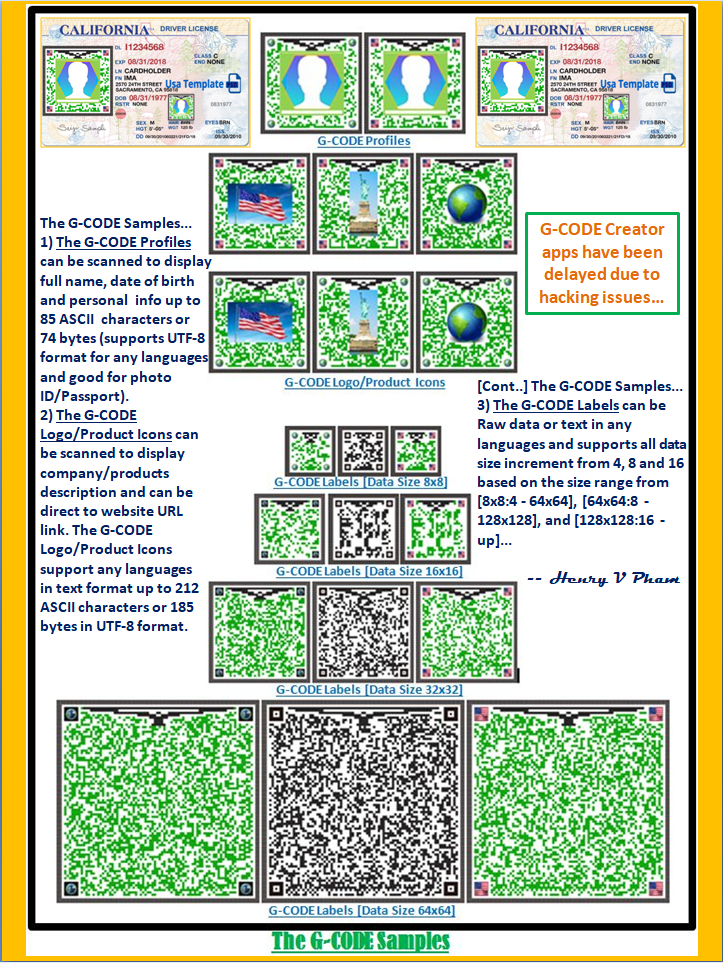
 G-CODE  SAMPLES


PREPARATION INSTRUCTIONS


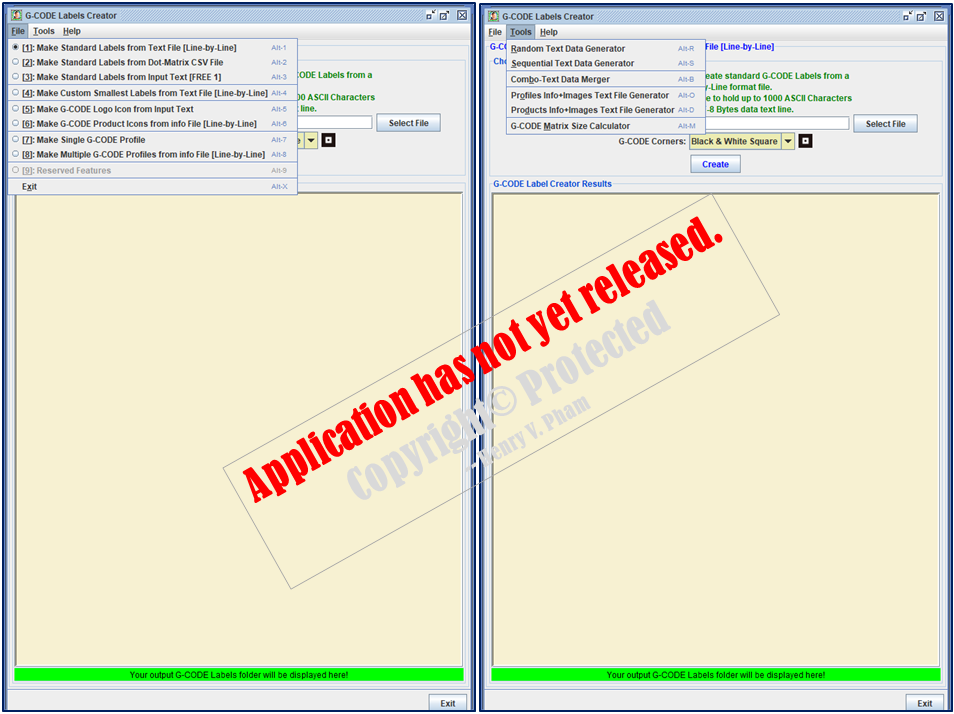
G-CODE File & Tools Menu (Has Not Released)


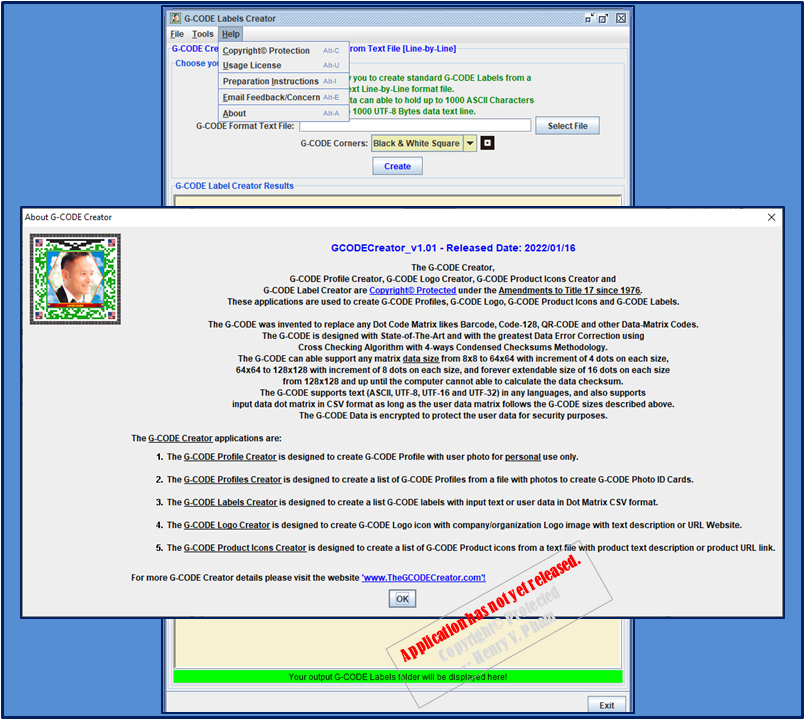
G-CODE Help Menu (Has Not Released)

[1]: Make Standard Labels from Text File [Line-by-Line]

  1. Use the G-CODE Matrix Size Calculator from the Tools menu to calculate the data size you want.
  2. Use the Text Data Generator applications from the Tools menu to create your Text Data file.
  3. Save and Prepare your Text Data file format line-by-line.
  4. From G-CODE Creator application, select option [1] from the File menu to create G-CODE Labels.
  5. Select your Text Data file to create G-CODE Labels.
  6. Select G-CODE Corners mode that you want the corners look like.
  7. Click on 'Create' button to start creating your G-CODE Labels.
  8. Click on the [green] output field to open your G-CODE Labels folder.
  9. Finally, open the G-CODE Data Reverter application with Output Format '-textln' to check the G-CODE Labels that have been created.
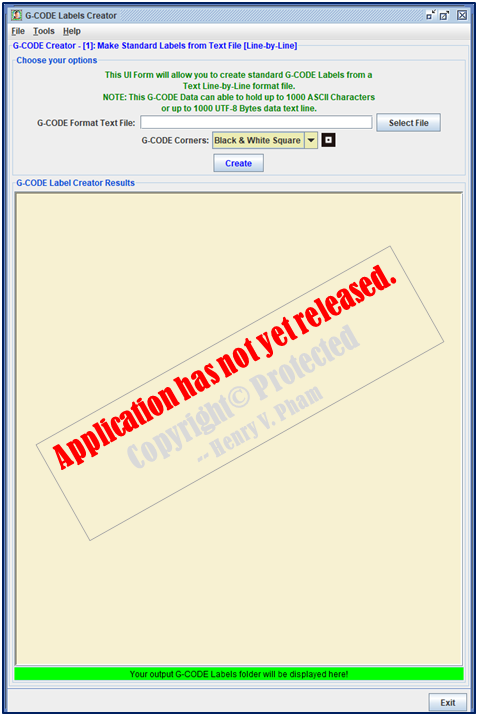
Option-1: Make Standard Labels from Text File [Line-by-Line] (Has Not Released)

[2]: Make Standard Labels from Dot-Matrix CSV File

  1. Prepare your Matrix Data file in CSV format as shown examples below.
  2. Make sure the Matrix Data size must be within the G-CODE required sizes below:
    1. Matrix Data Sizes within [8x8] to [64x64] must be incremented by 4 dots on each size.
    2. Matrix Data Sizes within [64x64] to [128x128] must be incremented by 8 dots on each size.
    3. Matrix Data Sizes from [128x128] and up must be incremented by 16 dots on each size.
  3. From G-CODE Creator application, select option [2] from the File menu to create G-CODE Labels from Dot-Matrix CSV File.
  4. Select your Matrix Data CSV file to create G-CODE Labels.
  5. Select G-CODE Corners mode that you want the corners look like.
  6. Click on 'Create' button to start creating your G-CODE Labels.
  7. Click on the [green] output field to open your G-CODE Labels folder.
  8. Finally, open the G-CODE Data Reverter application with Output Format '-matrix' to check the G-CODE Labels that have been created.

  9. ♦ Example of UserDataMatrix[8x8]:

    1,1,1,1,0,1,1,0
    0,1,0,0,1,0,1,1
    1,0,1,1,1,0,0,1
    1,1,1,0,0,0,1,1
    1,1,1,1,0,0,0,0
    0,0,0,0,0,1,0,1
    0,1,0,0,0,1,0,0
    1,0,1,0,1,0,0,0

    ♦ Example of UserDataMatrix[12x12]:

    0,0,0,0,1,0,1,0,0,1,0,0
    0,0,0,0,0,0,0,0,0,1,0,1
    0,1,1,1,0,1,1,0,1,1,1,0
    1,0,0,1,1,1,0,1,1,0,0,1
    1,0,1,0,1,1,0,0,1,0,0,0
    0,1,0,1,1,1,1,0,1,0,1,1
    1,0,1,1,1,0,1,0,0,0,1,0
    1,0,1,1,0,0,1,0,0,0,0,0
    1,1,1,1,0,1,0,1,0,1,0,1
    0,0,0,1,0,0,1,0,0,1,0,1
    0,1,1,0,1,1,1,1,0,0,1,1
    0,0,0,0,1,0,0,1,0,0,1,0
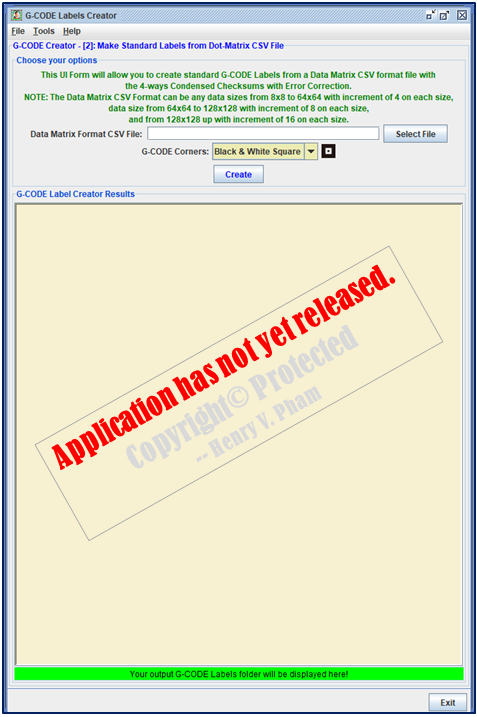
Option-2: Make Standard Labels from Dot-Matrix CSV File (Has Not Released)

[3]: Make Standard Labels from Input Text [FREE 1]

  1. Make a free Standard Label from Input Text.
  2. From G-CODE Creator application, select option [3] from the File menu to create G-CODE Label from Input Text.
  3. Enter your text within the length limitation.
  4. Select G-CODE Corners mode that you want the corners look like.
  5. Click on 'Create' button to start creating your G-CODE Label.
  6. Click on the [green] output field to open your G-CODE Label file.
  7. Finally, open the G-CODE Data Reverter application with Output Format '-textln' to check the G-CODE Label that has been created.
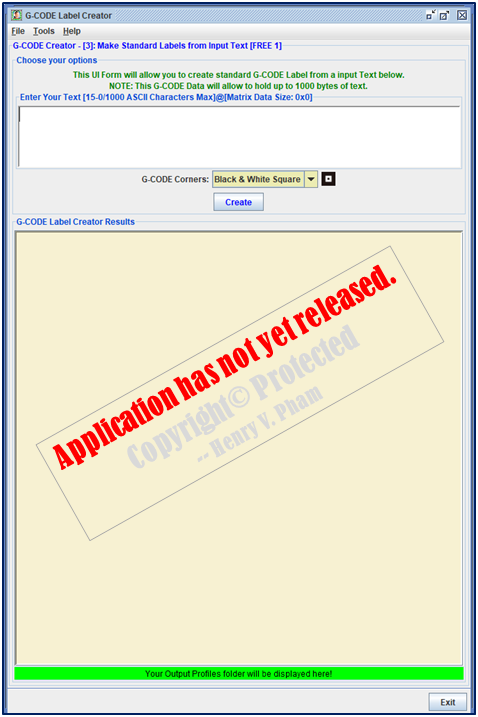
Option-3: Make Standard Labels from Input Text [FREE 1] (Has Not Released)

[4]: Make Custom Smallest Labels from Text File [Line-by-Line]

  1. Make custom G-CODE Labels with the data size [8x8] that can hold up to 21 ASCII Characters or 18 UTF-8 Bytes.
  2. Use the Text Data Generator applications from the Tools menu to create your Text Data file.
  3. Save and Prepare your Text Data file format line-by-line.
  4. From G-CODE Creator application, select option [4] from the File menu to create G-CODE Labels.
  5. Select your Text Data file to create custom G-CODE Labels.
  6. Select G-CODE Corners mode that you want the corners look like.
  7. Click on 'Create' button to start creating your custom G-CODE Labels.
  8. Click on the [green] output field to open your G-CODE Labels folder.
  9. Finally, open the G-CODE Data Reverter application with Output Format '-textln' to check the G-CODE Labels that have been created.
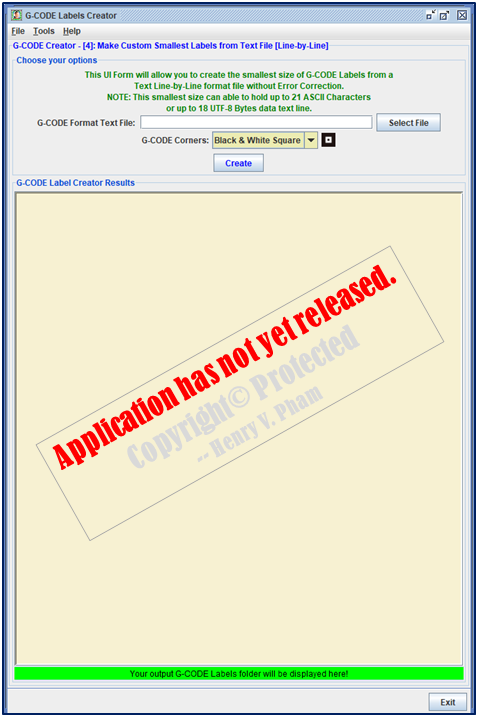
Option-4: Make Custom Smallest Labels from Text File [Line-by-Line] (Has Not Released)

[5]: Make G-CODE Logo Icon from Input Text

  1. Make a G-CODE Logo Icon from Input Text and Logo image.
  2. From G-CODE Creator application, select option [5] from the File menu to create G-CODE Logo Icon from Input Text and Logo image.
  3. Enter your company Web site URL or Logo Description within the length limitation.
  4. Select your company Logo image file.
  5. Select G-CODE Corners mode that you want the corners look like.
  6. Click on 'Create' button to start creating your G-CODE Logo Icon.
  7. Click on the [green] output field to open your G-CODE Logo Icon file.
  8. Finally, open the G-CODE Data Reverter application with Output Format '-textln' to check the G-CODE Logo Icon that has been created.
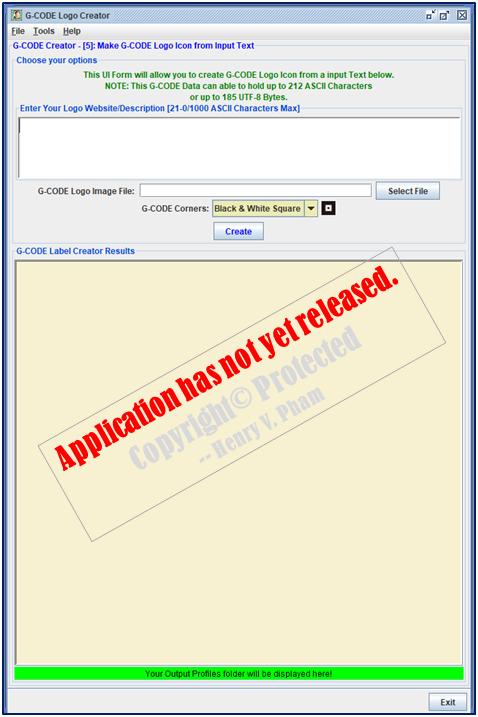
Option-5: Make G-CODE Logo Icon from Input Text (Has Not Released)

[6]: Make G-CODE Product Icons from Text File [Line-by-Line]

  1. Make G-CODE Product Icons from an input Text Format file line-by-line.
  2. Prepare your Product Image files [*.jpg] and Product Text Info files [*.info] with the same filename in 2 different file extensions.
  3. The Product Info files must have the first line with Product URL link or a short Product Description, and the text length must be within [85-212] characters for English and [75-185] bytes for Chinese and other languages.
  4. The G-CODE Product Icons can be scanned and link directly to the Product Web site with this input line from Text Info file.
  5. Use the Product Images File Generator application from the Tools menu to create your Text Data file. This file will contain Product Info and the Image files.
  6. Select your working folder that contains these Product Info files and Product Image files.
  7. Select the correct file types for your Product Info files and Product Image files.
  8. Click on 'Create' button to start creating your G-CODE Product Icons Text ready file.
  9. Click on the [green] output field to open your G-CODE Product Icon ready folder. This folder will be used to create your G-CODE Product Icons with the created Text ready file and the Image files.
  10. Save and Prepare your folder and Text Data file format line-by-line.
  11. From G-CODE Creator application, select option [6] from the File menu to create your G-CODE Product Icons.
  12. Select your G-CODE Product Icons Text ready file to create G-CODE Product Icons.
  13. Select G-CODE Corners mode that you want the corners look like.
  14. Click on 'Create' button to start creating your G-CODE Product Icons.
  15. Click on the [green] output field to open your G-CODE Product Icons folder.
  16. Finally, open the G-CODE Data Reverter application with Output Format '-textln' to check the G-CODE Product Icons that have been created.
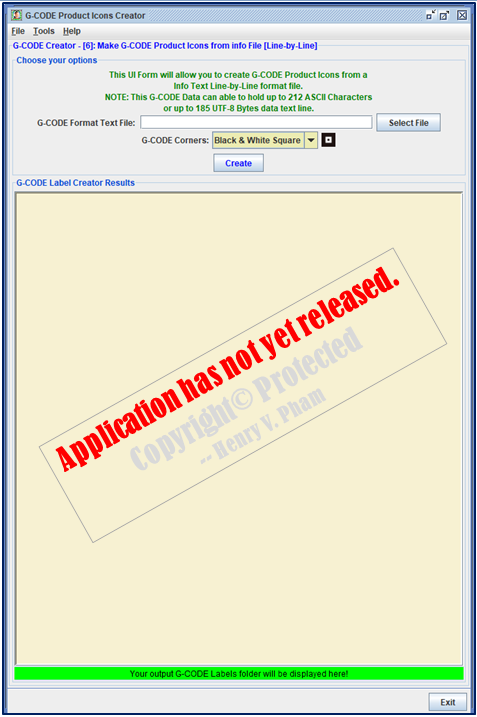
Option-6: Make G-CODE Product Icons from Text File [Line-by-Line] (Has Not Released)

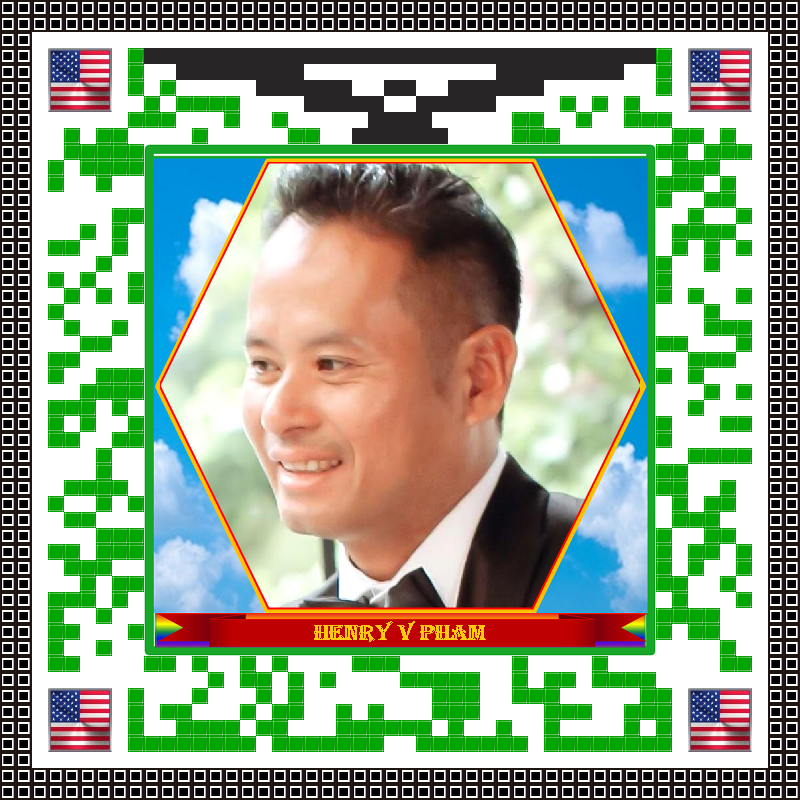
[7]: Make G-CODE Profile from input Text and Photo File.

  1. Prepare a nice looking profile photo.
  2. From G-CODE Profile Creator application, select a template with naming-banner that you like to crop your profile photo within the Hexagon.
  3. Click 'Next' button then select your profile photo file.
  4. Click the Arrow buttons and Zoom buttons to adjust the photo to crop within the yellow Hexagon.
  5. Click 'Crop' button to cut the photo the way you like then click 'Next' button to fill in your info.
  6. Enter your info then choose the correct font in your language then click 'Apply' button, your G-CODE Profile Icon will be created.
  7. Click on the [green] output field to open your G-CODE Profile Icon file.
  8. Finally, open the G-CODE Data Reverter application with Output Format '-textln' to check the G-CODE Profiles Icons that have been created.
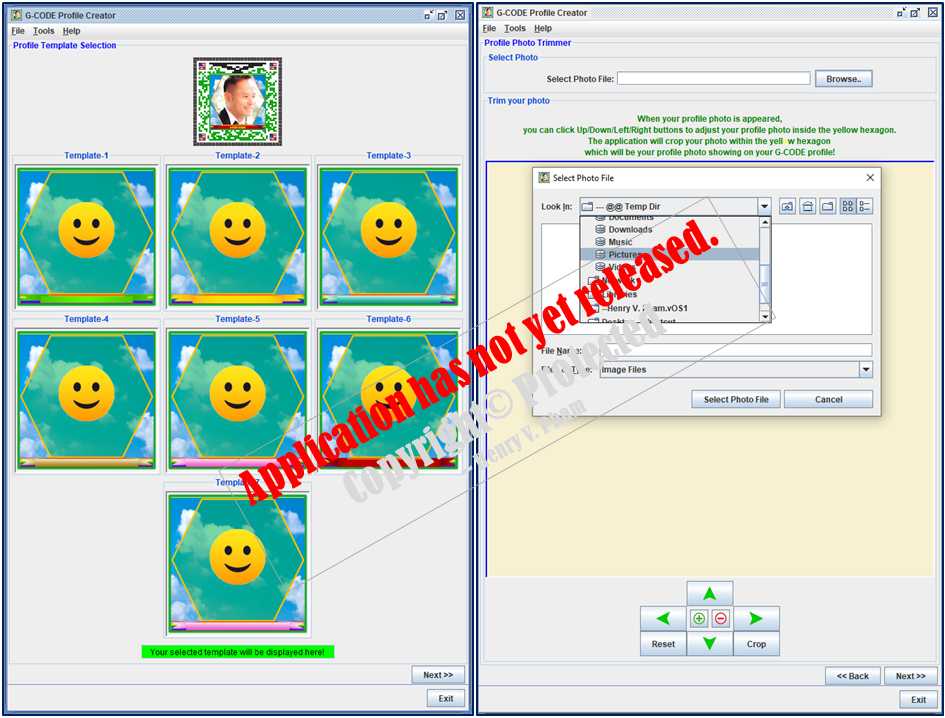
Option-7: Make G-CODE Profile from input Text and Photo File (Has Not Released)

[8]: Make G-CODE Profiles from Text File [Line-by-Line]

  1. Make G-CODE Profile Icons from an input Text Format file line-by-line.
  2. Prepare your Profile Image files [*.jpg] and Profile Text Info files [*.info] with the same filename in 2 different file extensions.
  3. The filename could be the Full-Name plus Date-of-Birth for both format files [*.jpg] and [*.info].
  4. The Profile Info files must have the first line with the Profile info as below with text length of [21-85] characters for English Profile and [18-74] bytes for Chinese and other languages.
    1. F:[FirstName ] - First Name is a must have and must be at least 2 Characters or 2 UTF-8 Bytes.
    2. M:[MiddleName] - Middle Name is an optional and must be at least 2 Characters or 2 UTF-8 Bytes if it is provided.
    3. L:[LastName ] - Last Name is a must have and must be at least 2 Characters or 2 UTF-8 Bytes.
    4. B:[BirthDate ] - BirthDate is a must have and must be in this format inside the square brackets [yyyy/MM/dd].
    5. E:[Email-Addr] - Email Address is an optional and must be valid if it is provided.
    6. I:[ID-AphaNumeric] - ID is a must have and must be ASCII Characters and Number from 5-15 characters.
  5. Use the Profile Info+Images Text File Generator application from the Tools menu to create your Text Data file. This file will contain Profile Info and the Image files.
  6. Select your working folder that contains these Profile Info files and Profile Image files.
  7. Select the correct file types for your Profile Info files and Profile Image files.
  8. Click on 'Create' button to start creating your G-CODE Profile Icons Text ready file.
  9. Click on the [green] output field to open your G-CODE Profile Icons ready folder. This folder will be used to create your G-CODE Profile Icons with the created Text ready file and the Image files.
  10. Save and Prepare your folder and Text Data file format line-by-line.
  11. From G-CODE Creator application, select option [8] from the File menu to create your G-CODE Profiles Icons.
  12. Select your G-CODE Profile Icons Text ready file to create G-CODE Profiles Icons.
  13. Select G-CODE Corners mode that you want the corners look like.
  14. Click on 'Create' button to start creating your G-CODE Profile Icons.
  15. Click on the [green] output field to open your G-CODE Profiles Icons folder.
  16. Finally, open the G-CODE Data Reverter application with Output Format '-textln' to check the G-CODE Profiles Icons that have been created.

  17. ♦ Examples of Profile Info Text at the first valid line in the Profile Info file:
    F:Jennifer M:R L:Smith B:03/25/1976 E:Jennifer.Smith@Gmail.com I:E673214232353
    F:Elizabeth M:V L:Thomas B:4/19/1993 E:Elizabeth.Thomas@Gmail.com I:E673214232353
    F:依 L:诺 B:01/15/1981 E:Yi.Chen@Gmail.com I:C673214232353
    F:Nhi M:Thi L:Huỳnh B:07/25/1985 E:Nhi.Huynh@Gmail.com I:V673214232353
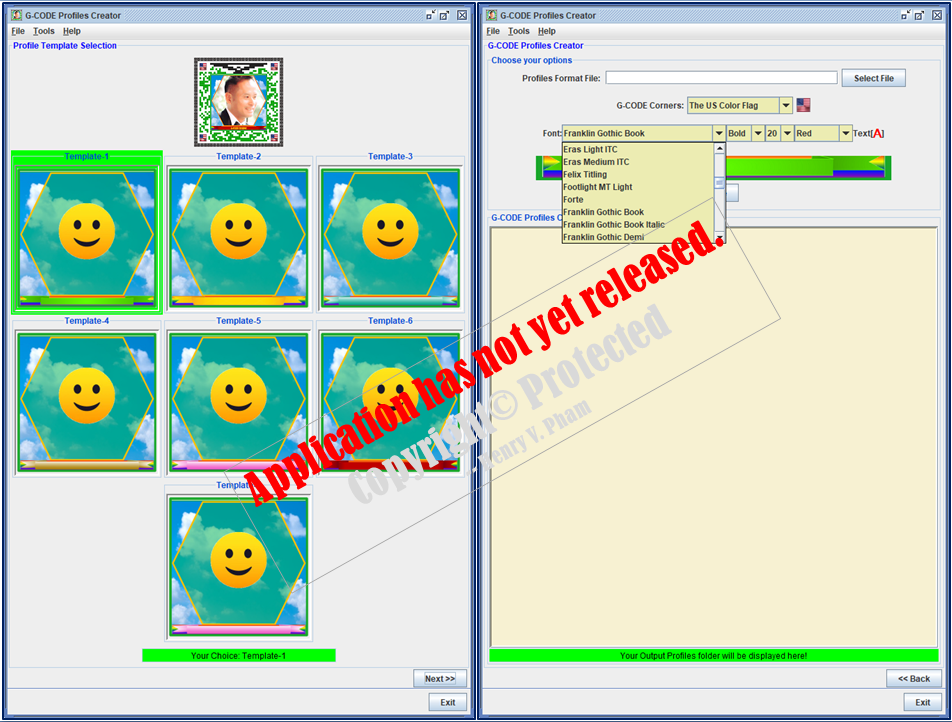
Option-8: Make G-CODE Profiles from Text File [Line-by-Line] (Has Not Released)

[9]: Reserved G-CODE Creator Features

  1. Reserved G-CODE Creator Features.

Linked-in Profile
☆☆☆☆☆☆☆☆☆☆ BELOW IS THE LIST OF MY WEBSITES ☆☆☆☆☆☆☆☆☆☆
(Note that some of these websites are still under construction to be linked correctly.)
www.TheCloudOSCenter.com | www.CloudOSCenter.com | www.CloudOSCompany.com | www.TheCloud-OS.com
www.TheGreatestDrive.com | www.GreatestDrive.com
www.TheGCODECreator.com | www.GCODECreator.com | www.GCODE-Creator.com
  www.ThePatrolCircle.com | www.PatrolCircle.com
www.TheCybercopterFlyer.com | www.CybercopterFlyer.com
☆☆☆☆☆

[Last updated: 2023-08-05 -- Henry V. Pham]

Copyright© 2021[⨢] by www.TheGCODECreator.com | www.TheCloudOSCenter.com. All Rights Resevered.